Pages

Sunday, 31 July 2022

Servlets

Servlet technology is used to create a web application (resides at server side and generates a dynamic web page). Servlet technology is robust and scalable because of java language. Before Servlet, CGI (Common Gateway Interface) scripting language was common as a server-side programming language.

There are many interfaces and classes in the Servlet API such as Servlet, GenericServlet, HttpServlet, ServletRequest, ServletResponse, etc.

Introduction to Servlets:

Servlet is a server-side Java program module that handles client requests and implements the servlet interface. Servlets can respond to any type of request, and they are commonly used to extend the applications hosted by web servers.
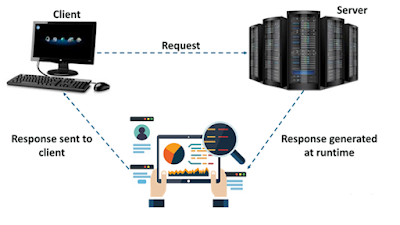

In this figure you can see, a client sends a request to the server and the server generates the response, analyses it and sends the response back to the client.
Servlet is a class that extends the capabilities of the servers and responds to the incoming requests. It can respond to any requests.
Servlet is a web component that is deployed on the server to create a dynamic web page.

What is a web application?
A web application is an application accessible from the web. A web application is composed of web components like Servlet, JSP, Filter, etc. and other elements such as HTML, CSS, and JavaScript. The web components typically execute in Web Server and respond to the HTTP request.
Google, Facebook, Twitter are examples of web applications.

CGI (Common Gateway Interface)
CGI technology enables the web server to call an external program and pass HTTP request information to the external program to process the request. For each request, it starts a new process.

Servlet Life Cycle:
The entire life cycle of a servlet is managed by the Servlet container which uses the javax.servlet.
Servlet interface to understand the Servlet object and manage it.
Servlet Life Cycle: The Servlet life cycle mainly goes through four stages:

•Loading a Servlet
When a server starts up, the servlet container deploy and loads all the servlets.

•Initializing the Servlet
Next, a servlet is initialized by calling the init() method. Servlet.init() method is called by the Servlet container to notify that this Servlet instance is instantiated successfully and is about to put into service.
public void init(ServletConfig config) throws ServletException  

•Request handling
Then, servlet calls service() method to process a client’s request and is invoked to inform the Servlet about the client requests. If servlet is initialized, it calls the service method. Notice that servlet is initialized only once. The syntax of the service method of the Servlet interface is given below:
public void service(ServletRequest request, ServletResponse response) throws ServletException, IOException
  
•Destroying the servlet
Finally, a servlet is terminated by calling the destroy(). The destroy() method runs only once during the lifetime of a Servlet and signals the end of the Servlet instance.init() and destroy() methods are called only once.
The syntax of the destroy method of the Servlet interface 
is given below:public void destroy()  

Example Program on Servlet:
 
import java.io.*;
import javax.servlet.*;
import javax.servlet.http.*;
  
// Extend HttpServlet class
public class MyServlet extends HttpServlet 
{ 
   private String output;
    
   // Initializing servlet 
   public void init() throws ServletException 
   {
      output = "Advance Java Concepts";
   }
  
   // Requesting and printing the output
   public void doGet(HttpServletRequest request, 
                    HttpServletResponse response)
      throws ServletException, IOException 
      {
         response.setContentType("text/html");
         PrintWriter out = response.getWriter();
         out.println(output);
      }
  
      public void destroy() 
      {
         System.out.println("Over");
      }
}

JSP : JSP technology is used to create web application just like Servlet technology. It can be thought of as an extension to Servlet because it provides more functionality than servlet such as expression language, JSTL, etc. A JSP page consists of HTML tags and JSP tags. The JSP pages are easier to maintain than Servlet because we can separate designing and development.

Advantages of JSP over Servlet:
•JSP codes are easy to write and maintain.
•Development speed becomes fast, and there is no need for recompilation and redeployment.
•It has high performance and scalability compared to other dynamic web development tools.
•JSP is constructed on Java technology, which makes it platform-independent.

JSP technology is used to create dynamic web Applications. JSP pages are easier to maintain then a Servlet. JSP pages are opposite of Servlets as a servlet adds HTML code inside Java code, while JSP adds Java code inside HTML using JSP tags. Everything a Servlet can do, a JSP page can also do it. JSP enables us to write HTML pages containing tags, inside which we can include powerful Java programs. Using JSP, one can easily separate Presentation and Business logic as a web designer can design and update JSP pages creating the presentation layer and java developer can write server side complex computational code without concerning the web design. And both the layers can easily interact over HTTP requests.

Why JSP is proffered over servlets?
•JSP provides an easier way to code dynamic web pages.
•JSP does not require additional files like, java class files, web.xml etc
•Any change in the JSP code is handled by Web Container(Application server like tomcat), and doesn't require re-compilation.
•JSP pages can be directly accessed, and web.xml mapping is not required like in servlets.

What is JSP LifeCycle?
JSP Life Cycle is defined as translation of JSP Page into servlet as a JSP Page needs to be converted into servlet first in order to process the service requests. The Life Cycle starts with the creation of JSP and ends with the disintegration of that.
The life cycle of a JSP page can be divided into the following phase:
1.Translation Phase
2.Compilation Phase
3.Initialization Phase
4.Execution Phase
5.Destruction(Cleanup) Phase
Let us understand these steps in detail.
1.Translation Phase
  • When a user navigates to a page ending with a .jsp extension in their web browser, the web browser sends an HTTP request to the webserver.
  • The webserver checks if a compiled version of the JSP page already exists.
  • If the JSP page's compiled version does not exist, the file is sent to the JSP Servlet engine, which converts it into servlet content (with .java extension). This process is known as translation.
  • The web container automatically translates the JSP page into a servlet. So as a developer, you don't have to worry about converting it manually.
2.Compilation Phase: 
In case the JSP page was not compiled previously or at any point in time, then the JSP page is compiled by the JSP engine.
In this compilation phase, the Translated .java file of the servlet is compiled into the Java servlet .class file.

3. Initialization Phase:  
In this Initialization phase: Here, the container will:
1.Load the equivalent servlet class.
2.Create instance.
3.Call the jspInit() method for initializing the servlet instance.
This initialization is done only once with the servlet's init method where database connection, opening files, and creating lookup tables are done.

4.Execution Phase:
This Execution phase is responsible for all JSP interactions and logic executions for all requests until the JSP gets destroyed. As the requested JSP page is loaded and initiated, the JSP engine has to invoke the jspService() method. This method is invoked as per the requests, responsible for generating responses for the associated requests, and responsible for all HTTP methods.

5.Destruction(Cleanup) Phase:
This destruction phase is invoked when the JSP has to be cleaned up from use by the container. The jspDestroy() method is invoked. You can incorporate and write cleanup codes inside this method for releasing database connections or closing any file.


Tuesday, 19 July 2022

API: Application Programming Interface

API stands for application program interface. A programmer writing an application program can make a request to the Operating System using API (using graphical user interface or command interface). It is a set of routines, protocols and tools for building software and applications. It may be any type of system like a web-based system, operating-system or a database System.
 
Java Compiler: It is a predefined program that converts the high level user written code language to low level computer- understandable byte code language during the compile time

JVM(Java Virtual Machine):processes the byte code obtained from the compiler and generates an output in user-readable format.

Java API:These are integral software packages that come along with JDK.The primary intention of API is to establish communication between applications.
Example:
iostream API are used to interact with Files 
jdbc API are used to interact with DataBase
net API are used to interact with Remote Handling Files 
Advantages of API:
Example:
javadoc - Generates HTML pages of API documentation from Java source files.
 
//Program
/* API MESSAGE DISPLAY */
public class Api
{
   public static void main(String[] args)
   {
    System.out.println("This line belongs to API");
   }
}
 
ubuntu@ubuntu:~/Desktop/rkjava/api$ javac Api.java
 
ubuntu@ubuntu:~/Desktop/rkjava/api$ ls
Api.class  Api.java
 
ubuntu@ubuntu:~/Desktop/rkjava/api$ javadoc Api.java


Sunday, 17 July 2022

JAR Files

The term JAR is an acronym built from the words: Java Application aRchive.

The term ‘archive’ is really key to understanding what a JAR file is. The JAR file is every file required to support an application zipped up and compressed into a single, archive file.

The Java JAR file uses a standard compression algorithm used by all of the most popular tools. A Java JAR file is really just a ZIP file with a .jar extension.

Functions with JAR file in Java: The basic functions of java JAR file are creating, updating, viewing and extracting. Let us look at them one by one.
 
1. In order to create a JAR file, we have to use the following 
syntax : 
jar -cf <jar_package_name> <original_package_name> .
The cf command means create-file. This creates a jar file of the package we are in currently.
 
2. In order to view the contents of a JAR file in table view, we use  
syntax: 
jar -tf <jarfilename>.jar. 
While displaying you may see the manifest file. So what is it? The manifest file contains the information regarding other files in the archive.
 
3. If we need to update the contents of the JAR file, we can use 
jar -uf <jarfilename>.jar (input_files)
 
4. When we need to extract a file with the help of a JAR file, we use jar -xf <jarfilename>.jar.

This action will create a MANIFEST file and a package containing the classes.

5. If we need to run a JAR file, we can use the command
 java -jar <jarfilename>.jar
 
Example:
 
Step 1 : create 3 files named by A.java B.java C.java
// A.java
package ram;
import sita.B;
import rk.C;
public class A
{
    public static void main(String[] a)
    {
    System.out.println("This is A class main method");
    B.m1();
    System.out.println("The value of integer variable is :"+C.a);
    }
}     
 
//B.java
package sita;
public class B
{
    public static void m1()
    {
    System.out.println(" This is B class main method");
    }
} 

//C.java
package rk;
public class C
{
    public static int a=143;
}    

Step 2:Use the following list of commands to create jar file
ubuntu@ubuntu:~/Desktop/pack$ gedit A.java
ubuntu@ubuntu:~/Desktop/pack$ gedit B.java
ubuntu@ubuntu:~/Desktop/pack$ gedit C.java
ubuntu@ubuntu:~/Desktop/pack$ javac -d . B.java
ubuntu@ubuntu:~/Desktop/pack$ ls
A.java  B.java  C.java  sita
ubuntu@ubuntu:~/Desktop/pack$ javac -d . C.java
ubuntu@ubuntu:~/Desktop/pack$ ls
A.java  B.java  C.java  rk  sita
ubuntu@ubuntu:~/Desktop/pack$ javac -d . A.java
ubuntu@ubuntu:~/Desktop/pack$ ls
A.java  B.java  C.java  ram  rk  sita
ubuntu@ubuntu:~/Desktop/pack$ jar -cf kiran.jar ram
ubuntu@ubuntu:~/Desktop/pack$ ls
A.java  B.java  C.java  kiran.jar  ram  rk  sita
ubuntu@ubuntu:~/Desktop/pack$ jar -tf kiran.jar
META-INF/
META-INF/MANIFEST.MF
ram/
ram/A.class
ubuntu@ubuntu:~/Desktop/pack$ jar -cf kiran.jar sita
ubuntu@ubuntu:~/Desktop/pack$ jar -tf kiran.jar
META-INF/
META-INF/MANIFEST.MF
sita/
sita/B.class
ubuntu@ubuntu:~/Desktop/pack$ jar -uf kiran.jar ram
ubuntu@ubuntu:~/Desktop/pack$ jar -tf kiran.jar
META-INF/
META-INF/MANIFEST.MF
sita/
sita/B.class
ram/
ram/A.class

 
Step 3: Now delete all the files such as A.java B.java C.java rk package,sita package, rk pakages files
 
Step 4:
Now run the jar file 
 jar xf <jarfilename>

Tuesday, 12 July 2022

Final variables Final methods and Final classes


Final variables, Final methods and Final classes
Final in Java is very important keyword and can be applied to class, method, and variables in Java.

Final variables
Any variable either a member variable or local variable (declared inside method or block) modified by final keyword is called final variable. Final variables are often declared with static keyword in java and treated as constant.
Ex:
public static final String LOAN = "loan";
LOAN = new String("loan") // error: cannot assign a value to final variable LOAN
Note: Final variables are by default read-only.
 
Example : Program on Final Variable.
class TestFinalVar
{
  public static void main(String[] args)
 {
  final int i=10;
  i=i+20;
  System.out.println(i);
 }
}
Output:
ubuntu@ubuntu:~/Desktop/rkjava$ javac TestFinalVar.java
TestFinalVar.java:6: error: cannot assign a value to final variable i
 i=i+20;
 ^
1 error

Final methods
A Java method with the final keyword is called a final method and it can not be overridden in the subclass. You should make a method final in Java if you think it’s complete and its behavior should remain constant in sub-classes.
In general, final methods are faster than non-final methods because they are not required to be resolved during run-time and they are bonded at compile time.
Example : Program on Final Method.
class Test
{
  void mnumber()
  {
  System.out.println("2345234523");
  }
  final void atmPin()
  {
  System.out.println("1234");
  }
}

class Abc extends Test
{
  void mnumber()
  {
  System.out.println("2345234123");
  }
  void atmPin()
  {
  System.out.println("1555");
  }
}
class TestFinalMet
{
 public static void main(String[] args)
 {
 Abc t =new Abc();
 t.mnumber();
 t.atmPin();
 }
}
 
Output:
ubuntu@ubuntu:~/Desktop/rkjava$ javac TestFinalMet.java
TestFinalMet.java:19: error: atmPin() in Abc cannot override atmPin() in Test
  void atmPin()
       ^
  overridden method is final
1 error
 
Ex:
class PersonalLoan
{
    public final String getName()
    {
    return "personal loan";
    }
}
class CheapPersonalLoan extends PersonalLoan
{
    //Override
    public final String getName()
    {
    return "cheap personal loan"; //compilation error: overridden method is final
    }
}

Output:
ubuntu@ubuntu:~/Desktop/rkjava$ javac PersonalLoan.java
PersonalLoan.java:11: error: getName() in CheapPersonalLoan cannot override getName() in PersonalLoan
    public final String getName()
                        ^
  overridden method is final
1 error

Final classes
The final class is complete in nature and can not be sub-classed or inherited. Several classes in Java are final e.g. String, Integer, and other wrapper classes.
 
Example : Program on Final Class.
final class Test
{
  void mnumber()
  {
  System.out.println("2345234523");
  }
  void atmPin()
  {
  System.out.println("1234");
  }
}

class Abc extends Test
{
  void mnumber()
  {
  System.out.println("2345234123");
  }
  void atmPin()
  {
  System.out.println("1555");
  }
}
class TestFinalMet
{
 public static void main(String[] args)
 {
 Abc t =new Abc();
 t.mnumber();
 t.atmPin();
 }
}
 
Output:
ubuntu@ubuntu:~/Desktop/rkjava$ javac TestFinalMet.java
TestFinalMet.java:13: error: cannot inherit from final Test
class Abc extends Test
                  ^
1 error


Ex:
final class PersonalLoan
{
}
class CheapPersonalLoan extends PersonalLoan
{
//compilation error: cannot inherit from final class
}
Output:
ubuntu@ubuntu:~/Desktop/rkjava$ javac PersonalLoan.java
PersonalLoan.java:5: error: cannot inherit from final PersonalLoan
class CheapPersonalLoan extends PersonalLoan
                                ^
1 error

Friday, 1 July 2022

JAVA LAB (2022) PROGRAMS

JAVA RECORD (2022) PROGRAMS  :
1.Write a program  to read Student Name, Register No, Marks[5], and calculate Total, Percentage, Result. Display all the details of students.  
import java.util.Scanner;
public class Studentdetails
{
      public static void main(String args[])
      {
          String name;
          int roll, math, stat, comp,seclang,eng;
          Scanner SC=new Scanner(System.in);
          System.out.print("Enter Name: ");
          name=SC.nextLine();
          System.out.print("Enter Roll Number: ");
          roll=SC.nextInt();
          System.out.print("Enter marks in English,Seclang, Maths, Stat and computers: ");
          eng=SC.nextInt();
          seclang=SC.nextInt();  
          math=SC.nextInt();
          stat=SC.nextInt();
          comp=SC.nextInt();
          int total = eng+seclang+math+stat+comp;
          float perc=(float)total/500*100;
          System.out.println("Roll Number:" + roll);
          System.out.println("Student  name :" +name);  
          System.out.println("Marks (Eng, Seclang,Maths, stat, comp):   " +eng+" "+seclang+"   "+math+","+stat+","+comp);
          System.out.println("Total: "+total +"\t\tPercentage: "+perc);
      } 
  }   

Output:
C:\Users\Student\Desktop\java prg>javac Studentdetails.java
C:\Users\Student\Desktop\java prg>java Studentdetails
Enter Name: raj kumar
Enter Roll Number: 323
Enter marks in English,Seclang, Maths, Stat and computers: 
22
33
44
121
33
Roll Number:323
Student  name :raj kumar
Marks (Eng, Seclang,Maths, stat, comp):   22 33   44,121,33
Total: 253              Percentage: 50.6

2.Write a Java Program Addition of Two Matrices:
import java.util.Scanner;
public class MatrixAdditionExample
{  
  public static void main(String args[])
  {  
    int row1, col1, row2, col2;
    Scanner s = new Scanner(System.in);
    System.out.print("Enter number of rows in first matrix:");
    row1 = s.nextInt();
    System.out.print("Enter number of columns in first matrix:");
    col1 = s.nextInt();
    System.out.print("Enter number of rows in second matrix:");
    row2 = s.nextInt();
    System.out.print("Enter number of columns in second matrix:");
    col2 = s.nextInt();
    if (col1 != row2)
     {
     System.out.println("Matrix Addition is not possible");
     }
    else
       {
        int a[][] = new int[row1][col1];
        int b[][] = new int[row2][col2];
        int c[][] = new int[row1][col2];
        System.out.println("Enter values for matrix A : \n");
        for (int i = 0; i < row1; i++)
          {
           for (int j = 0; j < col1; j++)
                a[i][j] = s.nextInt();
          }
    System.out.println("Entered values in matrix A : \n");
    for (int i = 0; i < row1; i++)
      {
        for (int j = 0; j < col1; j++)
        {
        System.out.print(a[i][j]+ "  ");
        }
       System.out.println( );
      }
    System.out.println("Enter values for matrix B : \n");
    for (int i = 0; i < row2; i++)
      {
       for (int j = 0; j < col2; j++)
                b[i][j] = s.nextInt();
       }
    System.out.println("Entered values in matrix B : \n");
    for (int i = 0; i < row2; i++)
    {
      for (int j = 0; j < col2; j++)
        {
        System.out.print(b[i][j]+ "  ");
        }
      System.out.println( );
    }
    for(int i = 0; i < row1; i++)
      {    
           for(int j = 0; j < col2; j++)
         {    
              c[i][j] = a[i][j] + b[i][j];      
             }
          }
    System.out.println("Matrix addition is : \n");
    for(int i = 0; i < row1; i++)
     {    
      for(int j = 0; j < col2; j++)
        {
        System.out.print(c[i][j]+ " ");      
         }
      System.out.println();          
     }
    }
  }
}
Output:
C:\Users\Student\Desktop\java prg>javac MatrixAdditionExample.java
C:\Users\Student\Desktop\java prg>java MatrixAdditionExample
Enter number of rows in first matrix:2
Enter number of columns in first matrix:2
Enter number of rows in second matrix:2
Enter number of columns in second matrix:2
Enter values for matrix A :

11
22
33
44
Entered values in matrix A :

11  22
33  44
Enter values for matrix B :

1
2
3
4
Entered values in matrix B :

1  2
3  4
Matrix addition is :

12 24
36 48

3.Write a Java Program Multiplication of Two Matrices:
import java.util.Scanner;
public class MatrixMultiplicationExample
{  
  public static void main(String args[])
  {  
    int row1, col1, row2, col2;
    Scanner s = new Scanner(System.in);
    System.out.print("Enter number of rows in first matrix:");
    row1 = s.nextInt();
    System.out.print("Enter number of columns in first matrix:");
    col1 = s.nextInt();
    System.out.print("Enter number of rows in second matrix:");
    row2 = s.nextInt();
    System.out.print("Enter number of columns in second matrix:");
    col2 = s.nextInt();
    if (col1 != row2)
     {
     System.out.println("Matrix multiplication is not possible");
     }
    else
    {
        int a[][] = new int[row1][col1];
        int b[][] = new int[row2][col2];
        int c[][] = new int[row1][col2];
        System.out.println("Enter values for matrix A : \n");
        for (int i = 0; i < row1; i++)
          {
          for (int j = 0; j < col1; j++)
               a[i][j] = s.nextInt();
          }
    System.out.println("Entered values in matrix A : \n");
    for (int i = 0; i < row1; i++)
      {
       for (int j = 0; j < col1; j++)
          {
          System.out.print(a[i][j]+ "  ");
          }
      System.out.println( );
      }
    System.out.println("Enter values for matrix B : \n");
    for (int i = 0; i < row2; i++)
        {
        for (int j = 0; j < col2; j++)
                b[i][j] = s.nextInt();
        }
    System.out.println("Entered values in matrix B : \n");
     for (int i = 0; i < row2; i++)
       {
        for (int j = 0; j < col2; j++)
           {
           System.out.print(b[i][j]+ "  ");
          }
       System.out.println( );
       }
   System.out.println("Matrix multiplication is : \n");
   for(int i = 0; i < row1; i++)
     {    
    for(int j = 0; j < col2; j++)
       {    
        c[i][j]=0;      
        for(int k = 0; k < col1; k++)
          {      
          c[i][j] += a[i][k] * b[k][j];      
          }
         System.out.print(c[i][j] + " ");  
       }
        System.out.println();
     }    
    }
  }
}

Output:
C:\Users\Student\Desktop\java prg>javac MatrixMultiplicationExample.java
C:\Users\Student\Desktop\java prg>java MatrixMultiplicationExample
Enter number of rows in first matrix:2
Enter number of columns in first matrix:2
Enter number of rows in second matrix:2
Enter number of columns in second matrix:2
Enter values for matrix A :

11
22
33
44
Entered values in matrix A :

11  22
33  44
Enter values for matrix B :

1
2
3
4
Entered values in matrix B :

1  2
3  4
Matrix multiplication is :

77 110
165 242


4. Write a java program  to implement constructors 
class Constructor
{
    double width;
    double height;
    double depth;
    Constructor() 
    {
System.out.println("Constructor without parameter");
width = 10;
height = 10;
depth = 10;
    }
    Constructor(int a, int b, int c) 
    {
System.out.println("Constructor with parameter");
width = a;
height = b;
depth = c;
    }
    double volume() 
    {
return width * height * depth;
    }
}
class ConstructorDemo
{
    public static void main(String args[]) 
    {
Constructor cuboid1 = new Constructor();
        double vol;
vol = cuboid1.volume();
System.out.println("Volume is " + vol);
Constructor cuboid2 = new Constructor(8,11,9);
vol = cuboid2.volume();
System.out.println("Volume is " + vol);
    }
}
Output:
C:\Users\Student\Desktop\java prg>javac ConstructorDemo.java
C:\Users\Student\Desktop\java prg>java ConstructorDemo
Constructor without parameter
Volume is 1000.0
Constructor with parameter
Volume is 792.0

5.Write a java program to calculate area of the following shapes using method overloading - Square, Rectangle,Circle,Triangle.
class MethodOverload 
{
    public static void main(String[] args)
    {
       CalculateArea ob = new CalculateArea();
   ob.area(4);
   ob.area(10f,12f);
   ob.area(5.5);
           ob.area(18.0,25.4);
    }
}
class CalculateArea
{
    void area(int x)
    {  
        int area=x*x;
        System.out.println("The area of the Square is "+area+" sq units");
    }
    void area(float x, float y)
    { 
        float area=x*y;
        System.out.println("The area of the Rectangle is "+area+" sq units");
    }
    void area(double x)
    {
        double z = 3.14 * x * x;
        System.out.println("The area of the Circle is "+z+" sq units");
    }
    void area(double b,double  h)
     {  
       double  t=(b*h)/2;
       System.out.println("The area of the Triangle "+t);
    }
}

Output:
C:\Users\Student\Desktop\java prg>javac MethodOverload.java
C:\Users\Student\Desktop\java prg>java MethodOverload
The area of the Square is 16 sq units
The area of the Rectangle is 120.0 sq units
The area of the Circle is 94.985 sq units
The area of the Triangle 228.6

6. Implement inheritance between person(Aadhar, Surname, Name, DOB, and Age) and Student (Admission Number, college, course, Year) classes where ReadData() and Display Data()are overriding methods.
import java.util.Scanner;
import java.util.Date;
class Person
{
   int Age;  
   long Aadhar;
   String DOB,sname,name;
    void Readdata()
   {
      Scanner sc=new Scanner(System.in);
      System.out.println("enter Aadhar no:");
      Aadhar = sc.nextLong();
      System.out.println("enter NAME "); 
       name = sc.next();
      System.out.println("enter Surname ");
       sname = sc.next();
      System.out.println("Enter your date of birth");
      DOB = sc.next();
      System.out.println("enter AGE:");
      Age=sc.nextInt();
     }
  void display()
  {
    System.out.println("person  details are:");
    System.out.println("---------------------:");
    System.out.println("ur Aadhar no is :"+Aadhar);
    System.out.println("ur Name and Surname is:"+name+" "+sname);
    System.out.println("ur Date Of birth is:"+DOB);
    System.out.println("ur Age is:"+Age);
  
    }
}
 class Student extends Person
 {
   int Adno,year;
   String clgname,course;
   void Readdata()
   {
    Scanner sc=new Scanner(System.in);
    System.out.println("-------------------:");
    System.out.println("enter Admission no:");
     Adno=sc.nextInt();
    System.out.println("enter clg name:");
     clgname=sc.next();
    System.out.println("enter course name :");
     course=sc.next();
    System.out.println("enter year of join:");
     year=sc.nextInt();
    }
  void display()
  {
    System.out.println("Student details are:");
    System.out.println("---------------------:");
    System.out.println("Admission no is:"+Adno );
    System.out.println("clgname is:"+clgname);   
    System.out.println("course is:"+course);
    System.out.println("year is "+year);
    }
}
class inhoverride
{
  public static void main(String args[]) 
  {
    Person p=new Person();
    p.Readdata();
    p.display();
   Student s=new Student();      
   s.Readdata();
    s.display();
   }
 }
Output:
C:\Users\Student\Desktop\java prg>javac inhoverride.java
C:\Users\Student\Desktop\java prg>java inhoverride
enter Aadhar no:
2356743456
enter NAME
raj kumar
enter Surname
Enter your date of birth
22-04-2001
enter AGE:
33
person  details are:
---------------------:
ur Aadhar no is :2356743456
ur Name and Surname is:raj kumar
ur Date Of birth is:22-04-2001
ur Age is:33
-------------------:
enter Admission no:
1121
enter clg name:
gvp
enter course name :
msc
enter year of join:
12-6-2001
Exception in thread "main" java.util.InputMismatchException
        at java.util.Scanner.throwFor(Scanner.java:819)
        at java.util.Scanner.next(Scanner.java:1431)
        at java.util.Scanner.nextInt(Scanner.java:2040)
        at java.util.Scanner.nextInt(Scanner.java:2000)
        at Student.Readdata(inhoverride.java:48)
        at inhoverride.main(inhoverride.java:68)

7. Java Program to Implementing Interface.
import java.util.Scanner;
interface area
{
    public void dimensions();
    public void area();
}
public class Interface_Implementation implements area
{
    int length,breadth,area;
    public void dimensions() 
    {
        Scanner s=new Scanner(System.in);
        System.out.print("Enter length:");
        length=s.nextInt();
        System.out.print("Enter breadth:");
        breadth=s.nextInt();
    }
    public void area() 
    {
        area=length*breadth;
        System.out.print("Area:"+area);
    }
    public static void main(String[] args) 
    {
        Interface_Implementation obj=new Interface_Implementation();
        obj.dimensions();
        obj.area();
    }
}
Output:
C:\Users\Student\Desktop\java prg>javac Interface_Implementation.java
C:\Users\Student\Desktop\java prg>java Interface_Implementation
Enter length:22
Enter breadth:44
Area:968

8.Java Program on Multiple Inheritance with interface
import java.lang.*;
interface Shape
 {
double area();
double perimeter();
}
class Rectangle implements Shape 
{
private double length;
private double breadth;
public Rectangle(double length, double breadth)
                {
this.length = length;
this.breadth = breadth;
        }
public double area()
                {
return length * breadth;
        }
public double perimeter() 
{
return 2 * (length + breadth);
}
}
class Circle implements Shape 
{
private double radius;
public Circle(double radius) 
{
this.radius = radius;
}
public double area() 
{
return Math.PI * radius * radius;
}
public double perimeter() 
{
return 2 * Math.PI * radius;
}
}
public class MInterface 
{
public static void main(String[] args)
{
// Rectangle area and parameter
double length = 2.0;
double breadth = 3.0;
Rectangle r = new Rectangle(length, breadth);
System.out.println("Rectangle - Area: " + r.area());
System.out.println("Rectangle - perimeter: " + r.perimeter());
// Circle area and parameter
double radius = 2.0;
Circle c = new Circle(radius);
System.out.println("Circle - Area: " + c.area());
System.out.println("Circle - perimeter: " + c.perimeter());
}
}
Output:
C:\Users\Student\Desktop\java prg>javac MInterface.java
C:\Users\Student\Desktop\java prg>java MInterface
Rectangle - Area: 6.0
Rectangle - perimeter: 10.0
Circle - Area: 12.566370614359172
Circle - perimeter: 12.566370614359172

9. Write a Java Program to perform the following String Operations.
Read a String
Find out whether there is a given substring or not
Compare existing string by another string and display status
Replace existing string character with another character
Count number of works in a string

import java.util.Scanner;
class read
{
void input()
{
System.out.println("READING A STRING FROM CONSOLE\n");
System.out.println("Enter a string: ");
Scanner sc=new Scanner(System.in);
String s=sc.nextLine();
System.out.println("String read from console is:\n "+s);
System.out.println("==================================\n\n");
}
}
class sub 
{
Scanner s=new Scanner(System.in);
void check()
{
System.out.println("CHECKING SUBSTRING:\n");
System.out.println("Enter the string:");
String txt=s.nextLine();
System.out.println("Enter the sub string:");
String st=s.nextLine();
boolean result = txt.contains(st);
if(result)
{
System.out.println(st + " is present in the string.");
}
else 
{
System.out.println(st + " is not present in the string.");
}
System.out.println("======================================\n\n");
}

}
class equal
{
Scanner s=new Scanner(System.in);
void compare()
{
System.out.println("COMPARING SUBSTRINGS:\n");
System.out.println("Enter a String:");
String txt=s.nextLine();
System.out.println("Enter 2nd String:");
String txt2=s.nextLine();
System.out.println("Enter 3rd String:");
String txt3=s.nextLine();
boolean result;
if(result=txt.equals(txt2))
{
                   System.out.println("\nString first and second are equal:"+result);
}
else if(result=txt.equals(txt3))
{
System.out.println("\nString first and third are equal:"+result);
}
else
{
System.out.println("Hence given Strings are not equal:");
}
System.out.println("=========================================\n\n");
}
}
class replace
{
String str="The quick brown fox jumps over the lazy dox";
String newstr;
void another()
{
System.out.println("REPLACING CHARACTERS:\n");
newstr=str.replace('d','f');
System.out.println("charcter Replacement :");
System.out.println("Original String :"+str);
System.out.println("New String is :"+newstr);
System.out.println("==================================\n\n");
}
}
class count
{
Scanner s=new Scanner(System.in);
void number()
{
System.out.println("COUNTING LENGTH OF A STRING:\n");
System.out.println("Enter the String to count the no. of words:");
String str=s.nextLine();
System.out.println("\nThe size of the String is:"+str.length());
System.out.println("==================================\n\n");
}
}
class strfun
{
public static void main(String args[])
{
read r=new read();
r.input();
sub s=new sub();
s.check();
equal e=new equal();
e.compare();
replace re=new replace();
re.another();
count c=new count();
c.number();
}
}
Output:
C:\Users\Student\Desktop\java prg>javac Strfun.java

C:\Users\Student\Desktop\java prg>java Strfun
READING A STRING FROM CONSOLE

Enter a string:
raj kumar
String read from console is:
 raj kumar
==================================


CHECKING SUBSTRING:

Enter the string:
welcome to java
Enter the sub string:
to
to is present in the string.
======================================


COMPARING SUBSTRINGS:

Enter a String:
ram
Enter 2nd String:
sita
Enter 3rd String:
ram

String first and third are equal:true
=========================================


REPLACING CHARACTERS:

charcter Replacement :
Original String :The quick brown fox jumps over the lazy dox
New String is :The quick brown fox jumps over the lazy fox
==================================


COUNTING LENGTH OF A STRING:

Enter the String to count the no. of words:
ram is a boy

The size of the String is:12
==================================

10.Write a java program to implement arithmetic package and perform addition,subtraction, multiplication and division operations with command line agruments

//Program :file name: Rk.java
package pk;
public class Rk
{
    public int add(int a,int b)
    {
        return a+b;
    }
    public int sub(int a,int b)
    {
        return a-b;
    }
    public int mul(int a,int b)
    {
        return a*b;
    }
    public int div(int a,int b)
    {
        return a/b;
    }
}

Step 2: create a file with Kk.java
import Pk.Rk;  // import <Package name>.<Class name>
class Kk
{
    public static void main(String []args)
    {
        Rk c=new Rk();
        int a=Integer.parseInt(args[0]);
        int b=Integer.parseInt(args[1]);
        int z=c.mul(a,b);
        int v=c.sub(a,b);
        System.out.println("Addition is:"+c.add(a,b));
        System.out.println("Division is:"+c.div(a,b));
        System.out.println("Multiplication is:"+z);
        System.out.println("Subtraction is:"+v);    
    }
}

Step 3: use the following command to run the package program 
ubuntu@ubuntu:~/Desktop$ mkdir pk
ubuntu@ubuntu:~/Desktop$ cd pk
ubuntu@ubuntu:~/Desktop/pk$ gedit Rk.java
ubuntu@ubuntu:~/Desktop/pk$ javac -d . Rk.java
ubuntu@ubuntu:~/Desktop/pk$ ls
pk  Rk.class  Rk.java
ubuntu@ubuntu:~/Desktop/pk$ cd ..
ubuntu@ubuntu:~/Desktop$ gedit Kk.java
ubuntu@ubuntu:~/Desktop$ javac -d . Kk.java
ubuntu@ubuntu:~/Desktop$ ls K*
Kk.class  Kk.java
ubuntu@ubuntu:~/Desktop$ java Kk 4 2
Addition is:6
Division is:2
Multiplication is:8
Subtraction is:2

11.Java program demonstrate the following exception handlings:
a.Dividesbyzero
b.ArrayIndexOutOfBound
c.Filenotfound
d.ArithmeticException
e.Userdefined Exception

import java.util.Scanner;
import java.io.*;
class dbz
{
void divide()
{
System.out.println("DIVIDED BY ZERO\n");
Scanner sc=new Scanner(System.in);
System.out.println("Enter P value: ");
int p=sc.nextInt();
System.out.println("enter Q value: ");
int q=sc.nextInt();
try
{
int result=p/q;
System.out.println("Result:"+p+"/"+q+"="+result);
}
catch(ArithmeticException e)
{
System.out.println("Divided by Zero");
}
System.out.println("====================");
}
}
class aiob
{
void array()
{
System.out.println("CHECKING ARRAY INDEX \n");
Scanner sc=new Scanner(System.in);
int a[]={1,2,3,4,5};
try
{
System.out.println("Array fixed size is 1 to 4");
System.out.println("Enter Array size: ");
int i=sc.nextInt();
if(a[i]<=5)
{
System.out.println(" Position of the given number is: "+a[i]);
}
}
catch(ArrayIndexOutOfBoundsException e)
{
System.out.println("Array Index out of Bound");
}
System.out.println("====================");
}
}
class fnf
{
void file()
{
System.out.println("FILE CHECKING\n");
try
{
FileInputStream fin=new                 FileInputStream("Desktop/stock.txt");
System.out.println("File Found");
}
catch(FileNotFoundException e)
{
System.out.println("File not Found");
}
System.out.println("=======================");
}
}
class arex
{
void arth()
{
System.out.println("ARITHMETIC EXCEPTION\n");
Scanner sc=new Scanner(System.in);
System.out.println("Enter A value: ");
int a=sc.nextInt();
System.out.println("enter B value: ");
int b=sc.nextInt();
try
{
int result=a/b;
System.out.println("Result:"+a+"/"+b+"="+result);
}
catch(ArithmeticException e)
{
System.out.println("Arithmetic Exception");
}
System.out.println("====================");
}
}


class AgeException extends Exception
 {
 public AgeException(String str)
 {
  System.out.println(str);
 }
}

 class udex 
{
void user()
{
System.out.println("USER DEFINED EXCEPTION\n");
Scanner sc=new Scanner(System.in);
try
{
System.out.println("Enter Age of Candidate: ");
int age=sc.nextInt();
                 
                        if(age < 18) 
                  throw new AgeException("Invalid age");
                  else
                   System.out.println("Valid age");
                }
           catch (AgeException a)
         {
             System.out.println(a);
         }
}
}
class main
{
public static void main(String args[])
{
dbz d=new dbz();
d.divide();
aiob a=new aiob();
a.array();
fnf f=new fnf();
f.file();
arex ae=new arex();
ae.arth();
udex u=new udex();
u.user();
}
}

Output:
C:\Users\Student\Desktop\java prg>
C:\Users\Student\Desktop\java prg>javac MainException.java

C:\Users\Student\Desktop\java prg>java MainException
DIVIDED BY ZERO

Enter P value:
11
enter Q value:
0
Divided by Zero
====================
CHECKING ARRAY INDEX

Array fixed size is 1 to 4
Enter Array size:
6
Array Index out of Bound
====================
FILE CHECKING

File not Found
=======================
ARITHMETIC EXCEPTION

Enter A value:
12
enter B value:
2
Result:12/2=6
====================
USER DEFINED EXCEPTION

Enter Age of Candidate:
10
Invalid age
AgeException

Servlet - JSP Programs

JSP(Java Server Pages) Programs : JavaServer Pages (JSP) is a Java standard technology that enables you to write dynamic data-driven pages f...